
The AI-Augmented Scholar owl mark AI in research and teaching

The AI-Augmented Scholar

Custom tools for real scholarship

I build AI tools for my own teaching and research. The ones that save me hours end up here, packaged so you can use them yourself.

Free tools

Tools and handouts from my own courses. Each one is free for an email address.

Free · Ready now

Green, yellow, red: the AI syllabus table

The one-page table from the video: each color of AI use, three examples, and the one-line test. Copy it into your syllabus and change the examples to fit your course.
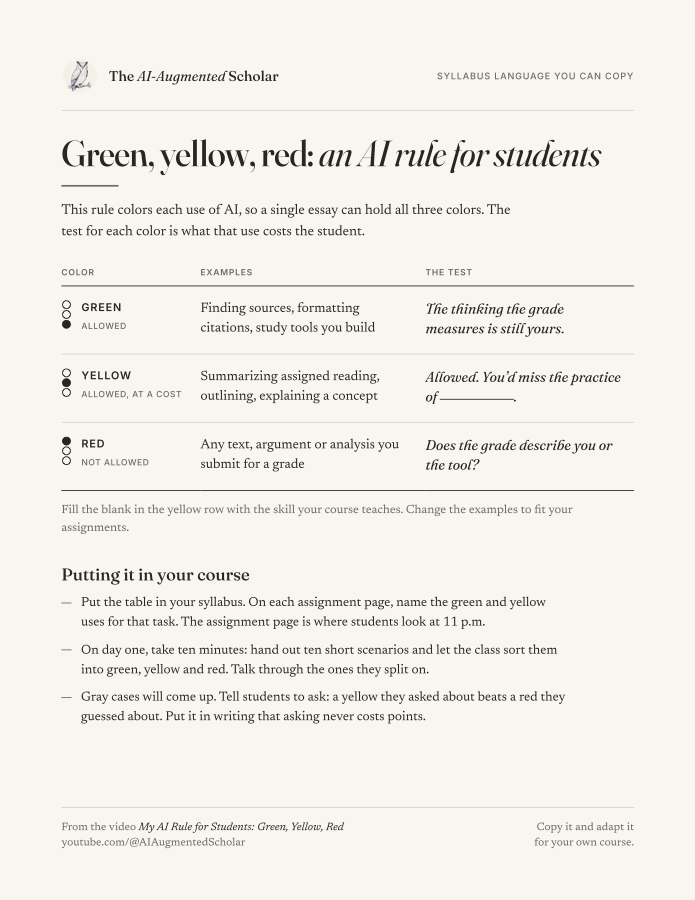
The one-page PDF: a three-row table for green, yellow and red uses of AI
Format
One-page PDF, US Letter

Free · Coming soon

Canvas quiz skill

Hand Claude a paper quiz and its answer key. It returns a file that Canvas imports as a finished quiz, with the right answers already marked.

  1. Quiz + answer key
  2. QTI .zip file
  3. Quiz in Canvas
Runs in
Claude Code or Cowork
Also does
Writes a new multiple-choice quiz from an assigned reading
Shown in
An upcoming video

Free · Coming soon

Teaching video skill pack

Film one take from your beat sheet. The pack cleans the audio, cuts the retakes, adds titles and captions, and trims short clips to share.

  1. Beat sheet
  2. Clean audio
  3. Cut retakes
  4. Titles
  5. Title and thumbnail
  6. Short clips
Runs in
Claude Code on a Mac with Apple Silicon
Works with
Any video editor, iMovie included
You need
A Claude subscription and your own recording

Front Office Solo

Software you buy once. On sale this fall.

Front Office Solo logo: a cabinet of staff mailboxes with one open slot holding a letter

On sale this fall

A front office for one researcher, on one Mac.

Front Office Solo grows out of the system I run my own academic week with, packaged to install on your Mac. It arrives empty. A setup conversation with Claude fills it with your courses, your accounts and the way you write.

  • Mission control

    Your morning brief, your deadlines and your calendar on one screen.

  • Email

    Drafts replies for every account you connect. It stops at the draft, and you press send.

  • Reading

    Turns a PDF into slides or an audio file, and searches the research literature.

  • Writing

    Drafts and revises in your voice, from rules drawn from your own writing.

  • Runs in Claude Code on a Mac, for one person
  • Brain, a private notes archive on your Mac, comes with it
  • One-time license with a year of updates
  • The installed version keeps working after the updates end

Videos

Where each tool gets built and shown, on YouTube.